Key Takeaways
- FieldPulse is field service software that unifies scheduling, dispatch, estimates, invoicing, payments, and customer records for garage door companies on desktop and mobile.
- Garage door businesses often lose revenue when manual handoffs break between the field and office, especially around inventory, job costing, multi-stage workflows, permissions, and accounting sync.
- For straightforward residential service calls, FieldPulse handles the core workflow with drag-and-drop scheduling, on-site invoicing, and text-to-pay options.
- As teams grow, FieldPulse adds ClearPath workflows, job costing, inventory management, role-based permissions, and two-way QuickBooks sync to support more complex operations.
- FieldPulse is built for established, team-based residential garage door companies in the 7-to-50-technician range that need a single source of truth across office and field teams.
The Problem: Where Garage Door Work Breaks Before The Software Does
Many garage door owners recognize this scenario. A spring replacement wraps up on a Tuesday afternoon. The tech drives out, does the job, collects a signature, and the invoice never follows. The office waits, then chases. By the time the invoice goes out, the customer barely remembers the job, and the cash sits uncollected for another week.
Another day, the opener install parts list lives on a clipboard. Or a warranty callback arrives that nobody can trace because the serial number sits in a text thread from two years ago.
The root cause is fragmentation, with information living in too many disconnected places. A fully digital business that still relies on manual handoffs runs into the same problem as one that uses clipboards. Growth outpaces process development, manual information tracking increases, and missed handoffs become common.
For a growing garage door business, the handoffs that break first usually cluster around five areas:
- Parts and inventory depth: per-truck stock of springs by cycle rating, rollers, cables, opener boards, and gear kits
- Job costing: knowing whether a spring replacement or a full door install actually made a profit margin
- Multi-stage workflows: an install with a crew of two and a punch-list inspection has a different shape than a 45-minute service call
- Permissions: separating what the office can see and change from what the field can see and change
- Accounting sync: keeping the books aligned with what is actually happening in the field
When all five show up at once, your team feels the strain unless your current platform can hold them.
What FieldPulse Does Well For Garage Door Companies
For straightforward residential service work, FieldPulse covers the core workflow. Its App Store listing describes capabilities that map cleanly to garage door jobs:

- Scheduling and dispatch: drag-and-drop calendar, recurring jobs, arrival windows, sending jobs to your techs’ calendars, in-app messaging, and notes and photos in the field
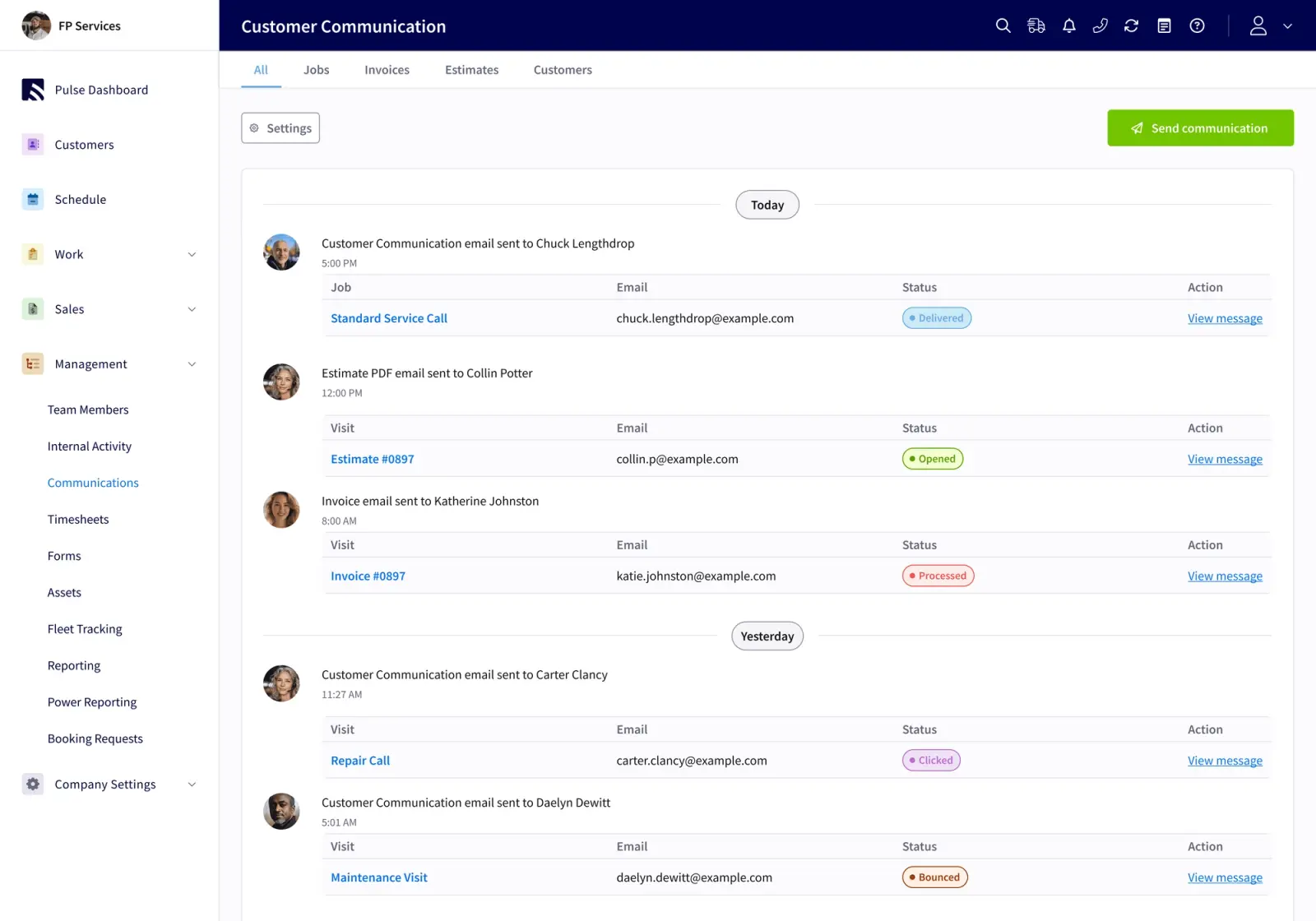
- Estimates and invoicing: create, update, and send from a computer or phone, add services during the job, and email estimates, invoices, and receipts automatically
- Payments: cards, ACH, and consumer financing, plus texted invoices so customers can pay by phone
- Customer records: contact details, the customer’s history, and job status updates in one place
For a garage door shop running tune-ups, spring replacements, and opener installs on a tight daily schedule, these tools handle the basics. The dispatch board keeps your techs moving. The mobile app lets them invoice on site. Customers get an on-the-way text and a payment link.

A Garage Door Job In FieldPulse, Step By Step
This is how a standard spring replacement flows through FieldPulse:

- The call comes in. The office books it on the dispatch board and assigns a tech.
- The tech gets the job on their phone with the address, customer notes, and arrival window.
- The tech arrives, records parts and labor in the mobile app, and captures a signature.
- The invoice is created and sent. Payment is collected on site or by text link.
This flow works for a straightforward service call. The strain shows up on jobs that do not fit that shape, such as a multi-stage opener install with a crew of two, a warranty callback tied to a serial number, or a truck that ran out of 25k-cycle torsion springs mid-week and turned a one-trip job into two.
Where Growing Garage Door Businesses Feel The Strain
Those misfit jobs point to a bigger issue. As your workflows, inventory, and accounting all become more demanding at the same time, a simpler tool stops carrying the load. Garage door companies run a hybrid model, part service business and part installer, and that mix creates specific pressure points that lighter platforms struggle to support.
Inventory depth. A typical garage door service truck stocks 80–150 line items, including springs by cycle rating, rollers, cables, opener boards, and gear kits. A truck low on the right spring turns a one-trip job into two. FieldPulse offers moderate, functional inventory tracking for garage door companies, with full inventory management available on its higher-tier plans. Platforms with deeper inventory modules support per-truck min/max levels, decrement on completion, and warehouse transfers.
Job costing. Knowing whether a spring replacement or a full door install actually made a profit margin requires labor hours tied to the specific job, not a weekly total. A weekly total hides which jobs are profitable, so you only find out after the fact, if at all.

Multi-stage workflows. An install with a crew of two, a load-out list, and a punch-list inspection is a different shape than a 45-minute service call. Your platform has to hold both without forcing one shape onto the other. FieldPulse works across a range of process complexity, from simple service calls to multi-stage installs, because ClearPath and Custom Workflows let your team configure job types, stages, and automations to match how you already operate.
Permissions. As your team grows, you need deliberate control over who can see and change what. If edit rights stay open to the whole team by default, anyone can alter a job record or an invoice, and the office loses the ability to separate its access from the field’s.
Two-way accounting sync. When your bookkeeper corrects something in QuickBooks, that fix needs to carry back into your field service software. A one-way push only sends data in one direction, so a correction made in QuickBooks can get overwritten the next time a job syncs, and the difference shows up at month-end.
See How FieldPulse Handles Your Workflows
Who FieldPulse Is Right For
FieldPulse fits an established, team-based residential garage door shop in the 7-to-50-technician range that wants one shared system instead of scattered tools. Your operation runs tune-ups, spring replacements, and opener swaps, and the owner or manager still stays close to most jobs. In that setting, FieldPulse covers the core workflow and gives you room to grow. That fit changes once your team grows and your workflows get more complex, which the next section explains.
How FieldPulse Supports A Growing Garage Door Business
For garage door companies in the same 7-to-50-technician range mentioned above, FieldPulse is built for the next stage. It connects your office and your field around one current set of job, customer, workflow, and payment information. You get that without the weight of an enterprise system.
Two garage door operators describe their experience in their own words. Cole Geiger of Statewide Garage Door says, “Real Teamwork not just software. FieldPulse Customer support and customization is really what sets them apart from other trade software platforms. Not just there to tell you where to look for an answer to a question but in some cases actually just took care of the issue. It’s as if you gain employees to YOUR business not just paying to use software.”
Greg Giaquinto of J.A.G and Sons Overhead Door shares, “This was not my first go around. I had already been through setting up two or three other softwares and so many FSMs lock you into their workflow. With FieldPulse, I can create my own workflow. Our three main job types are estimate, service, and installation, and each one of those has its own custom workflow to make sure we do not miss any steps. As we grow, FieldPulse grows with us.”
These capabilities help your team handle the pressure points that show up as you grow:
- ClearPath, included in the core platform, turns your process into your team’s workflow. You define the stages each job type moves through, such as estimate, service call, and install. You set required actions at each stage, and ClearPath’s Mobile Focus View shows your techs only what the current step needs. An install job and a service call each get their own sequence so nothing gets skipped.
- Job costing estimates your profit margin before you dispatch and confirms actual profit after completion. It ties labor hours to the specific job, not a weekly total.
- Inventory management tracks parts and materials with low-stock alerts, so the office knows what sits on each truck before booking a spring job.
- Roles and permissions give deliberate control over who can see and change what, so the office and field each have the right level of access without routing everything through one person.
- Two-way QuickBooks Online sync means a correction made in QuickBooks carries back into FieldPulse instead of being overwritten. Two-way sync keeps customers, invoices, payments, and vendors aligned in both directions. QuickBooks Desktop is also supported.
For a broader look at how these capabilities fit together for garage door teams, see Best Garage Door Business Software for Growing Teams, The Best Garage Door Management Software in 2026, Garage Door Service Software: A Workflow-First Buying Guide, and Garage Door Software That Syncs With QuickBooks.
Compliance documentation is another place handoffs break. The Door & Access Systems Manufacturers Association (DASMA) publishes the technical data sheets governing residential garage door and operator installation, including entrapment protection requirements. The U.S. Consumer Product Safety Commission enforces the federal automatic residential garage door operator standard, so photo-eye placement and force-setting documentation are a required part of the job record. FieldPulse’s job records, photos, and custom forms give your team a consistent place to store that documentation, attached directly to the job instead of buried in a text thread.
Frequently Asked Questions
What Does FieldPulse Do For Garage Door Companies?
FieldPulse gives garage door companies scheduling and dispatch, estimates and invoicing, payment collection, and customer records in one platform. Techs can receive jobs on their phones, record parts and labor in the field, capture signatures, and send invoices on site. The office gets a dispatch board with real-time job status and a customer record that holds the customer’s history. It covers the core service-call workflow for small residential operations.
Is FieldPulse Good For A Small Garage Door Shop?
Yes. For an established, team-based residential garage door shop moving off paper or spreadsheets and running tune-ups, spring replacements, and opener installs with a handful of technicians, FieldPulse handles the basics. Scheduling, dispatch, invoicing, and payments in FieldPulse are generally intuitive and easy to learn for most users, though some less tech-savvy users and certain specialized trades may face a steeper learning curve or need more setup. The fit question changes once your team grows and your workflows become more complex.
What Should A Garage Door Company Look At Instead Of FieldPulse?
For garage door companies in the 7-to-50-technician range that have outgrown a simpler tool, FSM software like FieldPulse is built for that next stage. It includes ClearPath for job stages and required actions at each stage, job costing so you know your profit margin before and after each job, inventory management with low-stock alerts, roles and permissions that give deliberate control over who can see and change what, and a two-way QuickBooks Online sync so corrections made in QuickBooks carry back into FieldPulse. QuickBooks Desktop is also supported.
How Long Does Implementation Take?
Onboarding typically runs two to six weeks, depending on your team size, which capabilities you turn on, how much data needs to migrate, and how your accounting setup is handled. An implementation manager runs recurring working sessions with you. The work gets sequenced into phases with tasks between sessions rather than dropped on you all at once. That structure helps your team adopt the system.
Can A Garage Door Company Keep Its QuickBooks Setup?
Yes. FieldPulse’s two-way QuickBooks Online sync brings your existing QuickBooks customers and records with you when you connect, so you are not rebuilding a customer list from scratch. Customers, line items, estimates, invoices, payments, purchase orders with full line-item detail, and vendors sync in both directions. Tax rates come from QuickBooks Online, and invoice numbering can follow your existing sequence. It works with QuickBooks Online Essentials, Plus, and Advanced. QuickBooks Desktop is also supported for businesses whose books have not moved to QuickBooks Online.
The Right Platform For Where Your Business Is Going
Growth problems show up as workflow problems first. The handoffs that break as a garage door business scales, such as inventory, job costing, multi-stage workflows, permissions, and accounting sync, do not fix themselves when you add more techs. They get harder.
As noted above, FieldPulse fits a small shop moving off paper, and it scales with you as your team grows. When your workflows, inventory, and accounting get more demanding, FieldPulse connects your office and your field around one current set of job, customer, workflow, and payment information. It gives your team one place to work, so you spend less time chasing details and more time closing profitable jobs.
Book A Demo For Your Garage Door Team