Key Takeaways
- Manual scheduling and disconnected systems create costly bottlenecks for growing residential service teams, especially during emergency calls.
- FieldPulse’s visual scheduling board with drag-and-drop tools and live tech locations removes manual handoffs and reduces dispatcher workload.
- ClearPath workflows let your office configure job stages once so your field follows consistent processes every day through a clean mobile app view.
- Automated customer notifications triggered at the right job stage keep customers informed without extra calls or messages from your team.
- FieldPulse is built for growing residential teams in HVAC, plumbing, and garage door service that need configurable scheduling that fits their actual workflow.
See how FieldPulse fits your dispatch workflow
Who FieldPulse Field Service Software Is Built For
FieldPulse is all-in-one FSM software for growing residential service teams in the 7-to-50-tech range across HVAC, plumbing, and garage door service. It connects your office and your field around one current set of job, customer, workflow, and payment information. The scheduling tools include a visual scheduling board with drag-and-drop controls, live tech locations, and ClearPath workflows that your office sets up once and your field follows every day.

FieldPulse’s scheduling model starts with your process. Your office defines the job stages. For an HVAC emergency, that might be Dispatched, En Route, On Site, Diagnosis Complete, Work Approved, and Job Complete. Inside each stage, you decide what must happen before the job moves forward, such as a photo, a checklist item, or a customer signature. Your techs see only what the current stage requires on their mobile app, through ClearPath’s Mobile Focus View, which shows a clean, ordered list instead of a full application to navigate.

FieldPulse also offers inventory management, roles and permissions, and job costing features. Inventory is a paid add-on, and job costing’s packaging is still being finalized. The platform is built primarily for residential teams, and that focus shapes setup and daily use.
Where Disconnected Systems Slow Growing Teams
Disconnected systems force your team to track information manually and increase the odds of missed handoffs. Growing teams most often run into trouble in these areas:
- Manual information tracking. When your dispatcher has to pull a tech off a scheduled job, notify the bumped customer, and update the board by hand, every new job makes the problem bigger.
- Missed handoffs. One missed update leaves a customer sitting at home waiting for a truck that is not coming. As your team grows, these handoffs increase and the risk compounds.
- Office staff overload. When one person handles dispatch, invoicing, and customer communication, every manual step adds complexity instead of removing it.
- Process-to-platform mismatch. When growth outpaces process development and your scheduling model still depends on manual handoffs, small workflow problems turn into daily operational headaches.
Picture a plumbing emergency. A burst pipe call comes in at 10 a.m. Your dispatcher needs to pull a tech off a scheduled drain cleaning, notify that customer, slot in the emergency, and update the board in under five minutes. If your current system forces phone calls instead of clicks, that sequence becomes a bottleneck.
The same pattern shows up on a garage door install that runs long. The tech needs more time, the next job has to shift, and the customer needs a heads-up. When your scheduling model depends on manual handoffs at each step, those small workflow problems become daily operational headaches.
How FieldPulse Handles Emergency And All-Day Jobs
Now walk through that same emergency HVAC call in FieldPulse, step by step.
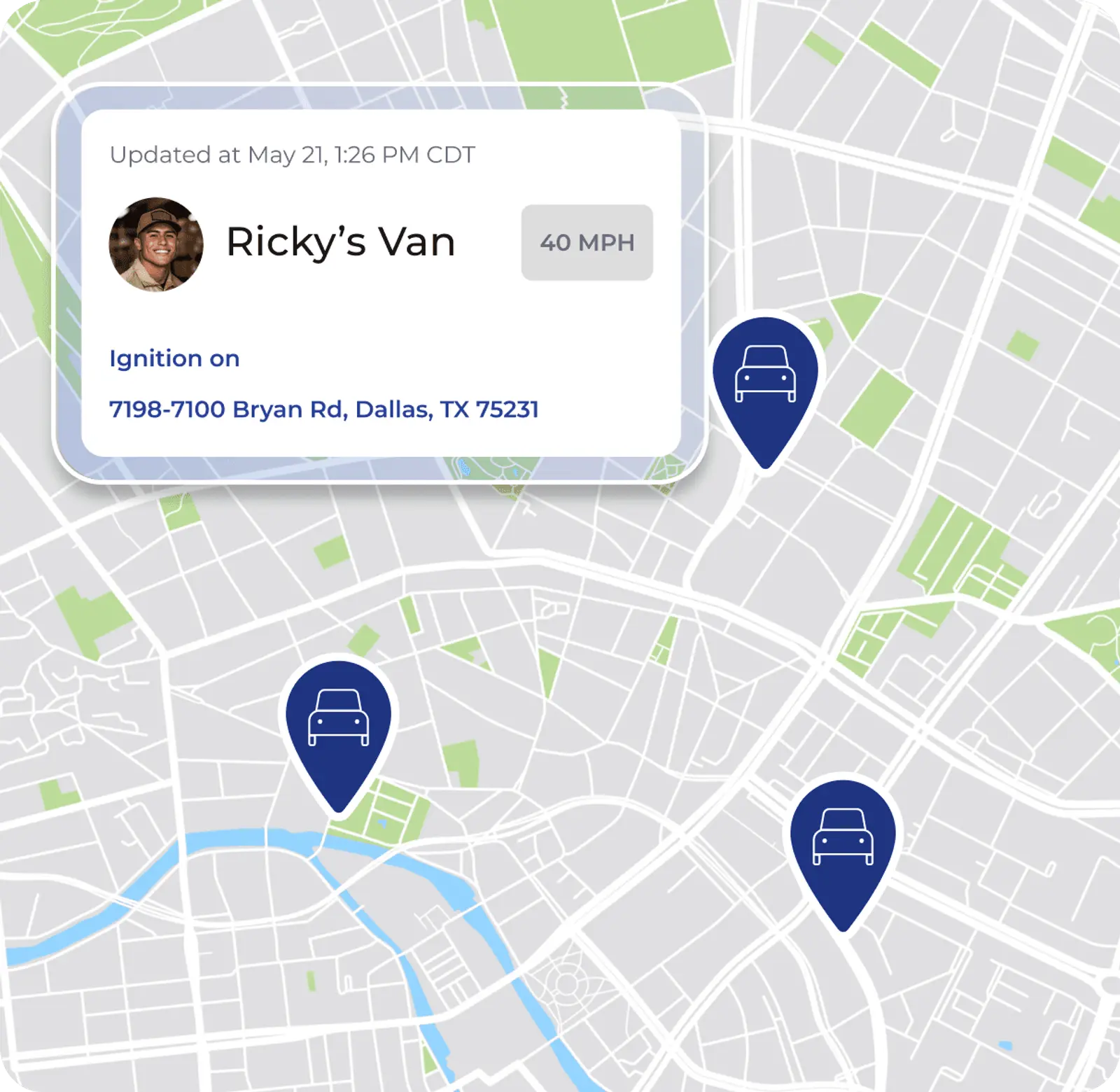
- Your dispatcher opens the scheduling board and sees every tech’s live location and current job status at a glance.
- They drag the emergency onto the nearest available tech’s schedule. The board updates instantly.
- The customer who got bumped receives an automated notification because ClearPath triggers customer messages at the right job stage.
- The tech receives the new job on their mobile app with the customer’s history, address, and notes already attached.
- When the tech marks themselves en route, an “On the Way” text fires to the customer automatically.
ClearPath sits at the center of this workflow and is included in the core platform. ClearPath turns your process into your team’s daily routine. Your office already defined the stages for emergencies, from Dispatched through Job Complete, along with the actions required at each step.
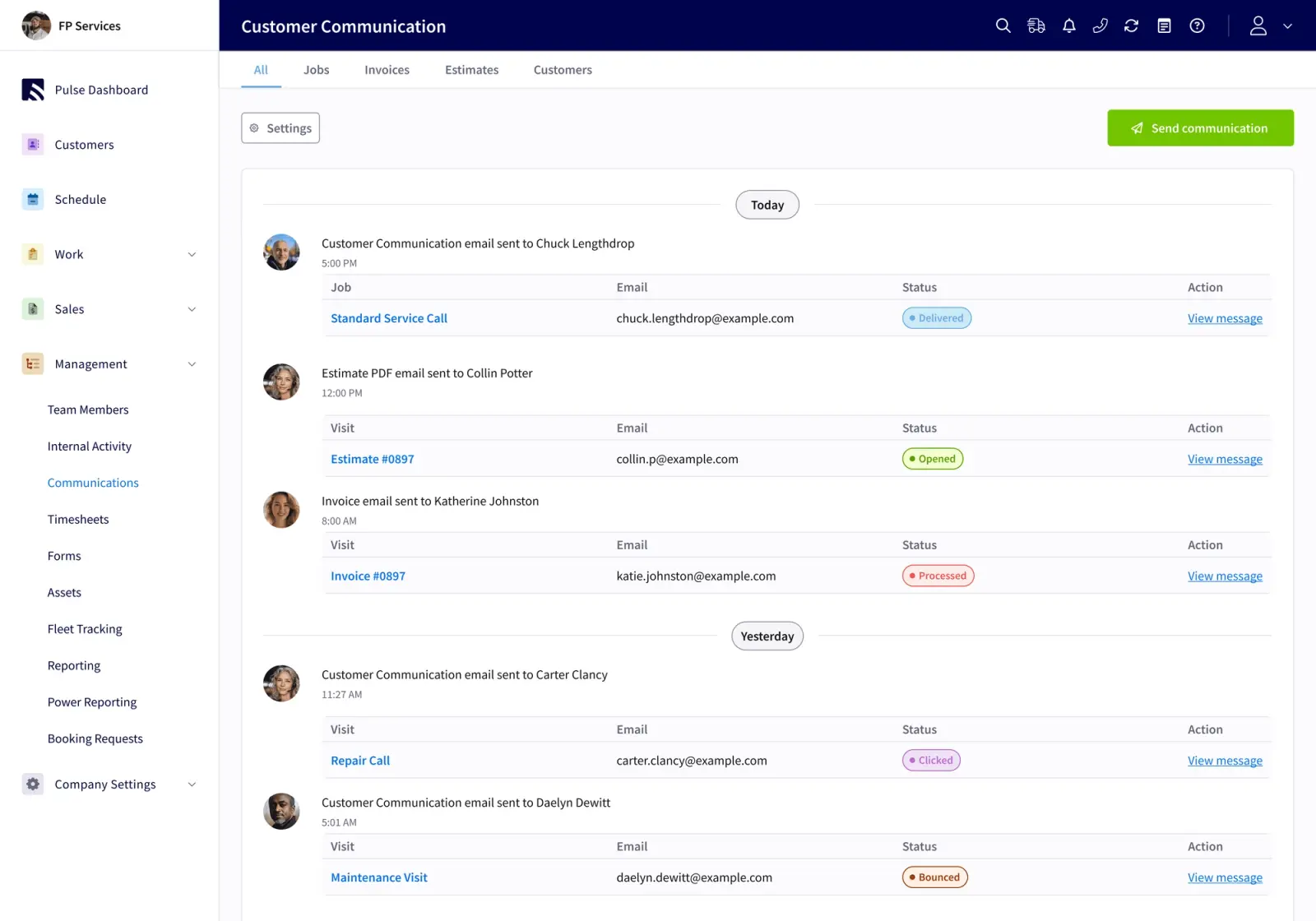
For an all-day install, you can add stage-specific actions. Your tech confirms floor protection before work begins. They get the customer’s sign-off before leaving. They clock in against the job so labor ties directly to job costing. Your office defines every step, your field follows it, and both sides see the same status in real time.
The FieldPulse mobile app is available in Spanish, enabled per user by the FieldPulse team. Spanish-speaking techs follow the same ClearPath stages as the rest of your crew in the language they use most comfortably. When a tech works in a basement or a rural service area with limited signal, the app caches the past week of jobs, projects, customers, estimates, and invoices on the device. Techs can complete a majority of the job without cell signal, and drafts sync once the device reconnects.

Walk through this scenario with our team
Side-By-Side Scenario: Scheduling An Emergency Call
The same emergency HVAC call at 2 p.m. plays out very differently depending on your scheduling model. For a team with one dispatcher and 10 to 15 techs, the difference shows up in four places: how fast the right tech is found, how the bumped job is rescheduled, how the customer is notified, and how job details reach the field. The table below walks through each.
| Step | Disconnected Systems | FieldPulse |
|---|---|---|
| Finding the right tech | Dispatcher searches through multiple systems or spreadsheets to locate an available tech with the right skills | Dispatcher sees live tech locations and current job status on the scheduling board, and drag-and-drop assignment puts the right tech on the call |
| Rescheduling the bumped job | Dispatcher adjusts multiple systems manually, and affected customer notification requires a separate call or message | Drag-and-drop rescheduling on the same board, and affected customer notification fires automatically at the right ClearPath stage |
| Customer communication | Manual notifications or separate systems for each job type | ClearPath triggers an “On the Way” text when the tech marks en route, configured once by your office |
| Tech receives job details | Job details may live in multiple places, and the tech may need to call the office for the customer’s history or notes | Full job details in the FieldPulse mobile app, including the customer’s history, equipment records, and ClearPath stage actions |
Both approaches handle the basic mechanics of emergency dispatch. The difference sits in setup effort and daily operational fit. The first two approaches, such as spreadsheets and point solutions, force your team to work around disconnected systems. FieldPulse’s model is configurable to your process from the start, with a scheduling board your dispatcher can run on day one.
Is FieldPulse Good For Growing Teams?
FieldPulse fits growing residential teams best when team size, trade, and structure match the platform. These points help you judge that fit.
- Team size and trade fit. FieldPulse works best for teams in the 7-to-50-tech range in HVAC, plumbing, and garage door service. It fits businesses where the office and field must stay in sync across multiple job types.
- Implementation and training effort. Onboarding typically runs two to six weeks. The timeline depends on your team size, which capabilities you enable, how much data needs to migrate, and how your accounting is set up. An implementation manager runs recurring working sessions with you.
- Office administrator adoption. FieldPulse’s permission structure gives edit rights deliberately. Your office defines the job stages and ClearPath workflows once, and your field follows them every day.
- Technician usability. The FieldPulse mobile app carries full job details and supports field estimates, signatures, and payments. ClearPath’s Mobile Focus View shows techs only what the current stage requires in a clean, ordered list.
- Financial visibility. FieldPulse includes job costing and reporting, so you know a job’s expected profit margin before you dispatch it. Because labor ties directly to each job, that profit margin stays visible as the work progresses.
- How information moves between office and field. FieldPulse connects your office and field around one current set of job, customer, workflow, and payment information. Your dispatcher sees live tech locations and current job status at a glance. Your techs receive new jobs on their mobile app with the customer’s history, address, and notes already attached.
Getting Started With FieldPulse Field Service Software
Your move to FieldPulse follows a clear sequence so your team knows what to expect.
Onboarding typically runs two to six weeks. The timeline depends on your team size, which capabilities you enable, how much data needs to migrate, and how your accounting is set up. An implementation manager runs recurring working sessions with you. The sequence is: scope the work, configure the foundation, migrate data and connect QuickBooks Online, train each role, then transition to ongoing support.
The two-way QuickBooks Online sync works with QuickBooks Online Essentials, Plus, and Advanced in the US, Canada, and Australia. Customers, line items, estimates, invoices, payments, purchase orders, and vendors sync in both directions. A correction made in QuickBooks carries back into FieldPulse instead of being overwritten.
Window Fix, a Brooklyn glass and window business, shows what this transition can look like. After 19 months on FieldPulse, they saved 15–20 hours per week, moved from net 30 to net 15 with management-company clients, cleared a backlog of 300-plus jobs stuck in a generic “on hold” status, and opened a second location in Bergen-Passaic, New Jersey, with five more franchise territories planned. Ernie Cappello, who took over the 50-year-old family business, put it directly: “I wasn’t able to do that cleanly with ServiceTitan.” Window Fix’s results show what is possible, but the work of switching is real.
Your team has to decide whether your current platform earns its place in your operation or asks your team to work around it every day.
Frequently Asked Questions
What Is FieldPulse Field Service Software?
FieldPulse is all-in-one FSM software for growing residential service teams in the 7-to-50-tech range across HVAC, plumbing, and garage door service. It connects your office and your field around one current set of job, customer, workflow, and payment information. Scheduling tools include a visual scheduling board with drag-and-drop controls, live tech locations, and ClearPath workflows that your office configures once and your field follows every day. The platform is built primarily for residential teams and also offers inventory management, roles and permissions, and job costing features. Inventory is a paid add-on, and job costing’s packaging is still being finalized.
Is FieldPulse Good For Growing Teams?
Yes, FieldPulse works well for growing residential teams in the 7-to-50-tech range. The scheduling model is configurable to your process from the start, with a scheduling board your dispatcher can run on day one. Your office defines the job stages and ClearPath workflows once, and your field follows them every day. If your office runs on one or two people handling dispatch, invoicing, and customer communication, FieldPulse’s workflow-first model reduces overhead instead of adding to it.
How Does FieldPulse Handle Dispatch And Routing?
FieldPulse dispatching centers on a visual scheduling board where your dispatcher can assign, drag-and-drop, and adjust job appointments. Your dispatcher sees live tech locations and current job status at a glance, and drag-and-drop assignment puts the right tech on the right call. ClearPath triggers customer notifications at the right job stage, without manual sends. Your office configures the workflows once, and your field follows them every day.
What Is The Best Scheduling Software For HVAC Companies?
The right scheduling software for an HVAC company depends on your team size, operational structure, and how information needs to move between your office and your field. For growing residential HVAC teams in the 7-to-50-tech range, a configurable, workflow-first platform that connects the office and field without enterprise overhead usually fits better. Key evaluation points include how quickly your dispatcher can absorb an emergency call without rebuilding the day through manual steps, how customer notifications fire at the right job stage, and whether your techs can follow the workflow on their phones without a lengthy training cycle. FieldPulse is built for this profile, with drag-and-drop scheduling, live tech locations, and ClearPath workflows that your office configures once and your field follows every day.
Conclusion: Next Steps For Growing Teams
FieldPulse field service software is built for growing residential teams in the 7-to-50-tech range that have outgrown simpler tools but are not ready for enterprise complexity. For these teams, the real question is whether the scheduling model fits how your team actually works today and whether your office can absorb the implementation without losing momentum.
Before you decide, take these practical steps:
- Document your current workflows. Write out how a standard HVAC service call moves from intake to invoice. Do the same for an emergency and a multi-day install. Mark where handoffs happen manually and where information gets lost.
- Identify your scheduling bottlenecks. Decide whether the main problem is finding the right tech, notifying customers, or getting job details to the field. That answer shapes which platform features matter most for your operation.
- Gather input from your office administrator and one tech. Your office administrator is the adoption gatekeeper. If they cannot see their workload getting smaller, the rollout will struggle. Your tech will judge the mobile app in the first week, so both perspectives matter before you sign anything.
- Evaluate fit over feature counts. The platform that fits your process is the one your team will actually use. A scheduling model built for a 50-location franchise may not fit a 15-tech residential HVAC team, even if both platforms look strong on paper.
FieldPulse is built for teams at exactly this turning point. See how FieldPulse handles scheduling, dispatch, and the emergency call scenario for your trade.
See how FieldPulse fits your dispatch workflow
For more on evaluating scheduling software by team size and workflow, see Field Service Scheduling Software: Match The Model To Yours, Field Service Scheduling & Dispatch: A Workflow Guide, and Best HVAC Field Service Management Software By Shop Size.