











Key Takeaways
- HVAC shops hit different workflow problems at 5, 10, and 20 technicians, and each stage needs a different software setup.
- At five technicians, scheduling chaos and missed invoicing show up first. At ten, pricing consistency and job economics matter more. At twenty, inventory, permissions, and multi-stage workflows all arrive together.
- FieldPulse uses ClearPath workflows, drag-and-drop scheduling, two-way QuickBooks sync, and maintenance agreement automation to solve these problems.
- Office teams save 40+ hours per month by removing double data entry and manual handoffs with one shared customer and job record.
- FieldPulse is built for established residential HVAC teams in the 7-to-50-technician range mentioned throughout this guide.
What Actually Breaks at 5, 10, and 20 Technicians
Growth breaks HVAC operations when team size outpaces process development. Manual information tracking increases, and missed handoffs pile up at every stage of the job.
At five technicians: You stay close enough to every job that memory still covers some gaps. Your dispatcher can rebuild the day on a whiteboard. The first cracks appear as schedule changes turn into phone tag, and a maintenance visit closes without an invoice going out. At the 5-technician mark, manual coordination becomes a full-time job, and whiteboards cannot update in real time, notify techs when jobs change, or prevent double-bookings.
At ten technicians: Memory no longer covers the gaps. Schedule changes trigger a call tree. Pricing varies by whoever built the estimate. Job completion no longer reliably becomes an invoice. Your office administrator starts chasing the last job ticket of the day so an invoice can go out. At the 8–10 technician threshold, dispatch complexity increases and features like technician-level reporting and service agreement automation start to matter.

At twenty technicians: Inventory, permissions, multi-stage workflows, and job economics all hit at once. A simpler tool cannot carry that load. Your business needs job stages your team defines, required actions at each stage, and a mobile view that shows a tech only what the current step needs.
The real problem is fragmentation. A fully digital business running on manual handoffs fails the same way as one running on paper. Information moves through people instead of through a dependable process, and people become a bottleneck that does not scale.
FieldPulse is built for established residential HVAC teams in the 7-to-50-technician range. The spine of the platform is ClearPath, included in the core platform, which turns your process into job stages your office defines, required actions at each stage, and a mobile view that shows a tech only what the current step needs.
For an all-day HVAC install, your office can build custom stages such as pre-job prep, equipment staging, installation, customer walkthrough, and closeout. You can attach required actions inside each one. For example, the tech must confirm they lined the floor before the install stage advances (required action: checklist item, responsible role: tech in the field). The customer must sign off before the closeout stage completes (required action: signature, responsible role: tech on site). The office sees every stage update in real time without a phone call.

“We like how the system is all in one. We have been able to get rid of 3 different apps so that everything is in one place… We especially like the ClearPath and custom statuses.” — Isaac Fernsler, Owner, South Shore Lock and Key
Dispatch and Scheduling Under Pressure
Emergency requests come in every day in HVAC. A compressor fails at noon in July. Your dispatcher has to find the right tech, move existing jobs, notify affected customers, and update everyone at once. One missed handoff becomes a customer sitting at home waiting for a truck that is not coming.
FieldPulse gives your dispatcher a drag-and-drop scheduling board with live technician locations. Rescheduling one job updates the whole day without a round of calls. The platform puts the right technician on the right call based on availability and location.

ClearPath status workflows push job progress to your office automatically. When a tech marks themselves en route, an “On the Way” text goes to the customer without anyone remembering to send it. When the job closes, the office knows without calling the truck. Your team absorbs the emergency without rebuilding the day through phone calls.

“Our monthly revenue grew from $60,000 to $100,000, representing a 67% increase, as a direct result of improved scheduling efficiency and reduced appointment gaps. At the same time, our appointment completion rate rose by over 20%, cutting missed or rescheduled jobs down to nearly zero.” — Luke Charlton, Mobile Recall Team
Maintenance Agreements and Recurring Revenue
Recurring maintenance creates reliable revenue for residential HVAC, and it disappears quickly when tracking depends on memory. When recurring maintenance visits are tracked manually, an estimated 30% of HVAC maintenance contracts lapse simply because the follow-up never happens.
FieldPulse’s Maintenance Agreements (a paid add-on) runs your recurring-service program on the contract terms instead of on whoever remembered to schedule the visit. That means the recurring-revenue tasks that usually slip through the cracks happen automatically:
- Automatic visit scheduling from contract terms
- Recurring invoice generation without manual effort
- Service reminders sent to both customers and techs ahead of scheduled visits
- Renewal alerts so contracts approaching expiration get flagged before they lapse
- Full service history per customer, accessible from the job record
Bayou South Mechanical, a 4-person HVAC team in Baton Rouge, replaced manual processes, launched a recurring maintenance program, and built a scalable foundation using FieldPulse. The program runs on the contract terms, so it keeps going even when someone forgets a calendar reminder.
Equipment History and Asset Records
A tech arriving at a repeat visit without context is set up for a callback. Without equipment-level asset tracking, technicians walk into jobs without context, leading to delays and repeat visits.
FieldPulse connects equipment records to the customer’s record so your tech arrives knowing what they are walking into. On a repeat visit, the job record gives your tech everything they need to diagnose without guessing:
- Prior job notes and photos from the last visit
- Equipment records with serial numbers and installation history
- Warranty documents attached to the asset
- The customer’s full job history and every logged communication
That setup creates a first-time fix instead of a callback. The customer record holds contact details, service locations, and the complete document trail, so your office can answer a customer’s question without interrupting a tech in the field. That record only stays accurate if it agrees with your books, which is where the QuickBooks connection matters.
Keeping the Books and the Field in Sync
FieldPulse syncs both ways with QuickBooks Online. The two-way sync means a correction your bookkeeper makes in QuickBooks Online carries back into FieldPulse instead of being overwritten.
Here is what syncs in both directions:
- Customers and line items
- Estimates and invoices
- Payments
- Purchase orders with full line-item detail
- Vendors
Timesheets flow into QuickBooks Online when a tech clocks out. Tax rates come from QuickBooks Online. Invoice numbering can follow your existing sequence. Payments follow the standard invoice-to-payment-to-undeposited-funds flow. Your existing QuickBooks Online customers and records come with you when you connect, so you are not rebuilding a customer list from scratch.
The integration works with QuickBooks Online Essentials, Plus, and Advanced in the US, Canada, and Australia. QuickBooks Desktop is also supported.
This connection is where double data entry ends. In a typical 5-to-20-technician shop without QuickBooks integration, owners report spending around eight hours per week re-entering invoices, payments, and job-cost data. A true two-way sync eliminates that re-entry and usually becomes the turning point where your office administrator decides the switch is worth it. Here is what their day looks like once that happens.
What Changes for the Office Administrator
Every job gets done twice in a shop without shared records. Your tech does it once in the field, writing notes, recording parts and labor, taking photos, and getting the signature. Because none of that reaches the office automatically, your office does it all over again at an office, reading the ticket, retyping the parts and labor into an invoice, and re-entering the customer into the accounting system. That second pass is invisible on any job sheet, and it scales with job volume rather than with revenue.
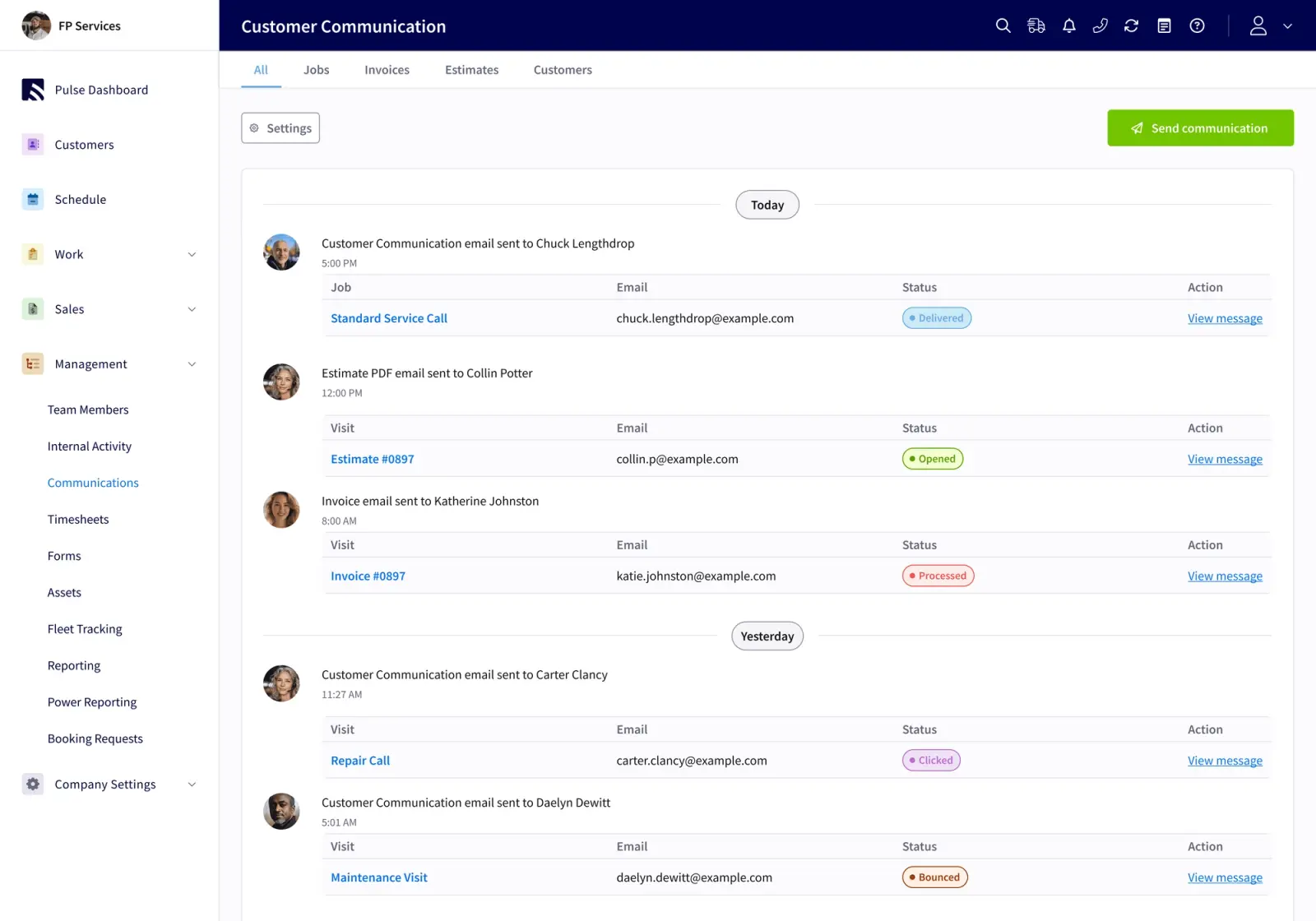
FieldPulse cuts that double-job tax with one shared customer and job record your whole team uses. Your office can answer a customer’s question without calling a truck. Roles and permissions give each person the access they need without everything routing through one person. The two-way QuickBooks sync means a fix made in the books carries back into FieldPulse, so your team avoids overwriting and re-entry.
On average, FieldPulse customers’ office teams save 40+ hours per month.
“Field Pulse has made our day to day operations much more organized and thorough. It enables our techs and office staff to communicate better with each other and with our customers. It has also made dispatching, invoicing, and estimates, all much easier to create and manage.” — Jamisen Both, IT Director, Top Notch Heat and Air
See what happens to duplicate entry when your books and your field service software finally agree. Bring your office manager to a live walkthrough and let them react in real time.
Walk Through a Day in the Office
How Long It Takes to Switch HVAC Field Service Software
Switching software takes real work, and planning for that work keeps the project on track. Onboarding typically runs two to six weeks, depending on your team size, which capabilities you turn on, how much data has to migrate, and how your accounting setup is handled.
The sequence usually follows these steps:
- Scope the work, including capabilities, data, accounting requirements, and your business complexity.
- Begin recurring working sessions with an implementation manager after signing.
- Configure the foundation, including system preferences, templates, permissions, ClearPath, and the mobile workflow.
- Move data and connect QuickBooks Online, which can extend the schedule.
- Enable each role through working sessions, live classes, and self-service resources.
- Transition to ongoing support.
Your team will have homework between sessions, and that work makes the change stick. RDI, a commercial installation business that grew from 15 to 50 employees on FieldPulse, put it plainly: “We ripped band-aids off one at a time, instead of all at once.” They rolled out time tracking on December 15, expected six months for adoption, and were running payroll off the app within two weeks.
FieldPulse’s support team is U.S.-based in Dallas, Texas, and customers mention it by name in reviews more than any single feature. Fair Comfort Solutions, an HVAC business that cut estimate creation time by 98% (from 4–8 hours per quote to 4–8 minutes), credits both the platform and the support team for making the transition work.
Frequently Asked Questions
How Long Does Implementation Take?
The typical implementation window runs two to six weeks, as described in the section above. The exact timing depends on your team size, which capabilities you enable, how much data has to migrate, and how your accounting setup is handled. Your team works with an implementation manager in recurring sessions and completes homework between meetings so adoption holds.
What Happens to the Books When You Switch?
Your existing QuickBooks Online customers and records come with you when you connect FieldPulse. The same two-way sync described earlier keeps customers, invoices, payments, and timesheets aligned in both systems. QuickBooks Desktop is also supported for businesses whose books have not moved to QuickBooks Online.
Does FieldPulse Work for a Residential HVAC Shop Running Maintenance Agreements?
Yes. Maintenance Agreements is the paid add-on described above, and it runs your recurring-service program on the contract terms instead of on memory. Bayou South Mechanical, a lean HVAC team, launched a recurring maintenance program using this capability and built a scalable, sellable foundation without adding headcount.
How Does FieldPulse Handle a Technician Working Without Signal?
FieldPulse caches the past week of jobs, projects, customers, estimates, and invoices on the device. In areas with weak or no connectivity, such as rural service areas, basements, and attics, your techs can complete a majority of the job without cell signal. They can view job details, add unlimited notes, upload up to 50 photos at a time, update job status, and clock in and out. If signal drops mid-edit, the active draft becomes an offline draft. Everything syncs as soon as the device is back in signal. ClearPath’s Mobile Focus View shows a technician only what the current job stage requires, and offline mode lets most of that work continue when signal drops.
How Do I Evaluate Alternatives?
Start by documenting your current workflow and marking where handoffs actually break, at the points where work stops moving. Those break points become your evaluation criteria. Then bring your office administrator into the process early, because a rollout stalls the moment the person doing the daily work is not convinced. With both in place, test each platform against your own job types rather than a vendor’s demo scenario. Ask how each platform handles the QuickBooks sync, what the onboarding timeline looks like, and what the technician’s mobile view shows at each stage of a job. Choose the platform that fits your workflow and closes your specific break points.
Next Steps for Your HVAC Shop
The decision framework is straightforward. Identify which workflow breakdown your shop has hit, match it to the platform that closes it, and bring your office administrator into the evaluation before you sign anything.
At 5 technicians, simpler tools may still carry you. At 10, pricing consistency and job economics become the deciding factors. At 20 and beyond, you need inventory, permissions, multi-stage workflows, and financial visibility in one place. FieldPulse fits established residential HVAC teams in the 7-to-50 range mentioned earlier, filling the gap between tools that are too simple and platforms that are too complex.
Your next steps are clear. Document your current workflow, identify where handoffs break, bring your office administrator into the evaluation, and test each platform against your own job types. See how FieldPulse connects your office and your field on one workflow.


