












Key Takeaways
-
Growth in electrical contracting creates operational breakdowns when information moves through people instead of systems. That pattern leads to uncollected invoices, unbilled change orders, and scattered documentation.
-
Electrical businesses with 7–50 technicians need software that keeps the office and field on the same page. That means permits and inspection results attach to the job record, and labor hours tie to specific jobs so you can see which work is actually profitable.
-
Key evaluation criteria include two-way QuickBooks Online sync, clear job-level job costing visibility, and mobile workflows that guide techs through required actions at each job stage.
-
Implementation typically takes two to six weeks with proper planning. That window covers data migration, system configuration, and role-based training so your team actually adopts the new process.
-
FieldPulse is built for the 7–50 technician mixed residential and commercial electrical operation that wants these capabilities without enterprise overhead.
See how FieldPulse connects your office and field
Where Growing Electrical Businesses Break Down
Growth outpaces process development. At five techs, you stay close enough to every job that memory covers the gaps. At fifteen, memory no longer works, and every gap turns into a phone call, a lost hour, or money that never gets collected.
Here are the breakdowns that show up most often:
-
The invoice that never follows the job. Your tech holds the parts, labor, and details of a panel upgrade. The office waits, then chases. Trying to reconstruct every connector, breaker, and half hour later is where money slips through the cracks. Cash that was already earned sits uncollected.
-
The change order nobody billed. A commercial project runs on T&M. A scope change gets agreed on site: a homeowner adds a circuit, or a GC adds work to a tenant improvement. A text message is evidence of an agreement, not a change order. Without a written, signed change order tied to the job record, that work becomes free work.
-
Documentation scattered across phones, texts, and access files. Panel photos before and after, permit numbers, inspection results, load calculations, and customer sign-offs live in three different places. Approved photos and documents should attach to the job record rather than living in personal text threads or camera rolls. On most teams, they do not.
-
The schedule-change call tree. An emergency request comes in and your dispatcher has to find the right tech, rearrange the day, notify affected customers, and update everyone manually. One missed handoff becomes a customer sitting at home waiting for a truck that is not coming.
-
Administrative work that eats evenings. The owner and the office finish the paperwork after the operational day ends because the process depends on re-entry and follow-up.
Fragmentation is the real problem, whether your business runs on paper or entirely on screens. A fully digital business with manual handoffs fails the same way because information moves through people, and people become a bottleneck that does not scale.

A Fit Framework For Electrical Contractors
The right platform depends on your team size and your work mix, not on feature count. The table below shows which type of platform fits each combination so you can see at a glance whether you need a simpler tool, FieldPulse, or an enterprise platform.
|
Work Mix |
Team Size |
Platform Type |
|---|---|---|
|
Residential service only |
Smaller or simpler operation |
Simpler field service software (Housecall Pro, Jobber) |
|
Mixed residential service and commercial project work |
7–50 technicians |
FieldPulse — all-in-one FSM software for mixed residential and commercial work |
|
Project-heavy subcontracting |
Larger or enterprise operation |
Commercial project platforms (ServiceTitan) |
The table gives you the shape of the market. Now look at each platform in detail, starting with the one built for the 7–50 technician mixed operation.
See how FieldPulse fits your electrical workflow
The Shortlist, Evaluated On Electrical Workflow Fit
1. FieldPulse: Built For 7–50 Techs With Mixed Work
FieldPulse fits the electrical team that has outgrown a simpler tool and does not need enterprise overhead. It carries a job from first call to final payment on one record. Electrical-specific documentation attaches to that record, and labor hours tie to the job. That structure makes your profit margin visible at the job level, not just at month-end.
These features make it fit electrical work specifically:
-
ClearPath turns your process into job stages with required actions at each stage. A service call and a commercial install move through different stage sequences. ClearPath’s Mobile Focus View shows your tech only what the current step needs, as a short ordered list instead of a full application to navigate. Your office defines the required actions at each stage, and the tech follows them in the field.
-
Custom Forms (add-on) attaches permits, inspection results, panel photos before and after, load calculations, and customer signatures directly to the job record. Forms auto-fill from related job data and techs complete them in the field.
-
Job costing ties labor hours to the job itself instead of to a weekly total. You know a job’s expected profit margin before you dispatch it, and you confirm actual profit at completion.
-
Two-way QuickBooks Online sync means a correction your bookkeeper makes in QuickBooks carries back into FieldPulse instead of being overwritten. The sync covers the records that matter most: customers, estimates, invoices, payments, purchase orders, and vendors all move in both directions.
Named electrical customer results back this up. FNW Construction, an electrical contractor in California, reported 4–6 hours saved weekly and a 23% revenue increase. Stewart Electrical Contracting reported 30% fewer missed appointments and 5+ hours saved weekly on admin work. Southern Maine Electric was up and running within two weeks of rollout. GSE Integrated, an electrical business with 21–30 techs, cited the weekly customer success meeting as a key part of their experience: “We also love that there is a weekly meeting with our Customer Success Manager where we can ask for workflow help, make feature requests, and stay in the loop on updates.” — Shane Richard, GSE Integrated.
FieldPulse holds a 4.8 out of 5 aggregate rating across G2, Capterra, the App Store, the Google Play Store, and other software-review sites.
2. ServiceTitan: Enterprise Depth For Larger Teams
ServiceTitan is a cloud platform positioned for larger operations. It offers deep reporting, marketing attribution, a pricebook, payments, and customer experience tools across multiple departments. The implementation is more involved and the overhead is higher, which is the right trade-off for some operations and the wrong one for others.
3. Housecall Pro And Jobber: Simple Tools For Smaller Teams
Both platforms work well for residential service-focused teams. Their support for multi-stage project workflows, permit and inspection dependencies, and close-out documentation trails is more limited than project-first platforms. If your work mix is primarily fast-turn residential service calls and your team is on the smaller end, either is a reasonable fit. When your workflows, permissions, or job economics become more demanding than a simpler tool can carry, that turning point signals it is time to look at FieldPulse.
Walk through FieldPulse with an electrical specialist
How Electrical Documentation Stays With The Job
Electrical work generates a documentation trail that your team needs to pull up quickly. Permits, rough-in and final inspection results, panel photos before and after, load calculations, NEC compliance checklists, and customer sign-off all matter. Paper job cards get wet, torn, illegible, or lost between the job site and the office. Photos end up in a camera roll. Permit numbers live in a text thread.
With FieldPulse’s Custom Forms add-on, your office builds the forms your electrical work requires, such as panel location and amperage, permit number, inspection result, before-and-after photos, and customer signature, and attaches them directly to the job record. Your office defines the required fields, and your tech completes them in the field at the appropriate job stage. ClearPath’s Mobile Focus View shows your tech only what the current stage requires. A rough-in checklist appears at rough-in, and a final inspection form appears at closeout. The completed record, including photos, signatures, permit status, and inspection results, lives on the job instead of in someone’s phone.

Job Costing On Electrical Work
The real question is whether your platform ties labor to the job so you can see which jobs make money. Theory about profit margin matters less than that visibility.
With FieldPulse, your techs clock in against the job itself. That setup ties labor hours to specific work, such as a panel upgrade, a commercial fit-out, or a service call, instead of letting them disappear into a weekly total. Your office can see the expected profit margin before the job goes out and confirm actual profit at completion. The owner’s real question is which job types make money. Job costing in FieldPulse answers that question as part of normal work instead of as an end-of-month reconstruction project.

The QuickBooks Question Every Electrical Contractor Should Ask
One diagnostic question helps you compare platforms. When your bookkeeper corrects something in QuickBooks Online, how does that fix get back into your field service software?
With most platforms, the fix never returns and the next sync overwrites it. With FieldPulse, the sync runs both ways. The sync covers customers, estimates, invoices, payments, purchase orders, and vendors in both directions. When your tech clocks out, timesheets flow into QuickBooks Online automatically. Tax rates come from QuickBooks Online. Invoice numbering can follow your existing sequence. The integration works with QuickBooks Online Essentials, Plus, and Advanced in the US, Canada, and Australia. Ask every platform you evaluate the same question before you sign.
What The First 90 Days With FieldPulse Look Like
Switching platforms takes real work, so a clear plan matters. Onboarding with FieldPulse typically runs two to six weeks, depending on your team size, which capabilities you turn on, how much data needs to migrate, and how your accounting setup is handled.
The sequence usually follows these steps:
-
Scope the work, including capabilities, data, accounting requirements, and your business complexity.
-
Assign an implementation manager and start recurring working sessions.
-
Configure the foundation, such as system preferences, templates, permissions, ClearPath, and the mobile workflow.
-
Move data and connect QuickBooks Online, which can extend the schedule.
-
Train each role through working sessions, live classes, and self-service resources.
-
Transition to ongoing support.
Southern Maine Electric, mentioned earlier, was one of the faster launches. Plan against the full two-to-six-week window so you are not caught short. As RDI put it after their own rollout: “We ripped band-aids off one at a time, instead of all at once.”
If your office administrator carries most of the administrative burden right now, it helps to pinpoint where that load is heaviest before your demo. Take the Admin Workload Assessment.
What Is A Good CRM For Electricians?
A good CRM for electricians keeps your customer’s history, equipment records, job history, permit numbers, inspection results, and every logged communication in one place. That way your tech arrives at a repeat visit already knowing what is on the panel and what was done last time, and your office can answer a customer’s question without calling the truck.
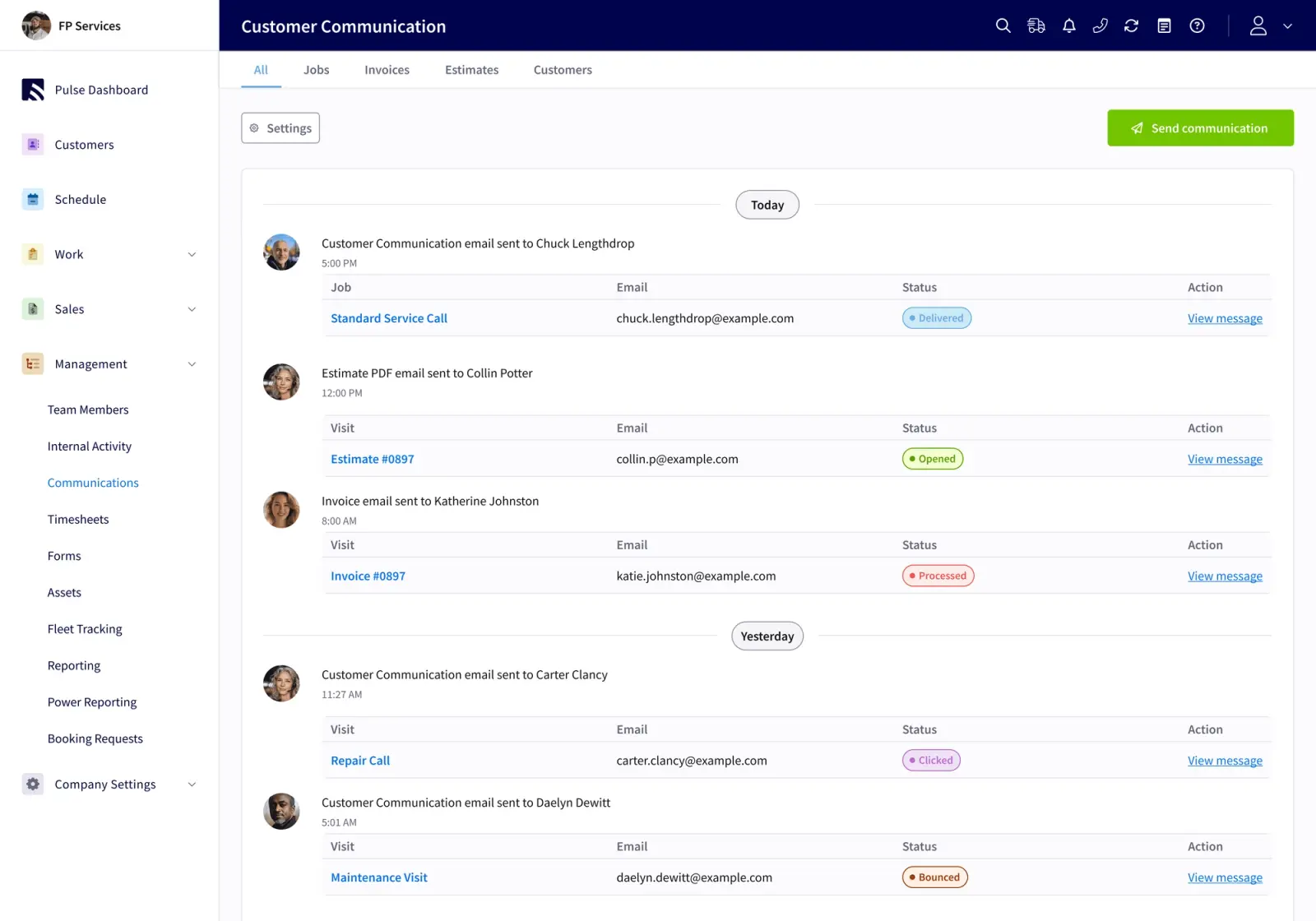
For a 7–50 technician electrical team mixing residential service with commercial project work, FieldPulse fits that description. It holds contact details, service locations, full job history, photos, files, invoices, and every communication on one customer record. For smaller or simpler operations, Housecall Pro and Jobber are worth evaluating. For larger operations needing enterprise depth, ServiceTitan is the category leader.
The practical test is simple. Your office should be able to answer a customer’s question about their last panel inspection without interrupting a tech. If that does not happen today, your CRM needs an upgrade.
What Is The Best Software For Managing Electrical Contractors?
The best FSM software for managing electrical contractors depends on your team size and work mix. For a 7–50 technician team mixing residential service calls with commercial project work, FieldPulse connects your office and field on one workflow, attaches electrical documentation to the job record, and ties labor to the job without enterprise overhead. For smaller or simpler service-only operations, Housecall Pro or Jobber are reasonable starting points. For large operations needing enterprise-level depth, ServiceTitan is built for that scale.
What Should I Expect From Implementation?
Plan for two to six weeks with FieldPulse, depending on team size, capabilities enabled, data migration volume, and accounting setup. You work with an implementation manager who runs recurring working sessions with you. The rollout is phased: office configuration first, then data migration and QuickBooks connection, then role-by-role training. Faster launches happen, but planning against the full window keeps expectations realistic.
How Do I Evaluate Alternatives Fairly?
Take one real job you completed last month and try to cost it out, including parts, labor, drive time, the change order that got agreed on site, and the invoice that went out days later. If you cannot do that without an afternoon of reconstruction, that gap is your answer. Ask every platform you evaluate two questions: does it tie labor hours to the job, and when your bookkeeper corrects something in QuickBooks, how does that fix get back into the field service software?
Conclusion: Choosing Your Electrical Platform
Fragmentation is what breaks an electrical business as it grows, whether the team is trying hard or not. For a 7–50 technician team mixing residential service with commercial project work, the right software does four things: it carries a job from first call to final payment on one record, attaches permits and inspection results to that record, ties labor to the job, and syncs both ways with QuickBooks Online. FieldPulse is built for that operation.
Before your next demo, document your current workflows, identify where jobs stall between the field and the office, and bring your office manager and a tech into the conversation. The office manager often acts as the adoption gatekeeper. If they cannot see their workload getting smaller, the rollout will not hold. The tech’s first week on the mobile app often decides whether the whole implementation sticks.
Compare your shortlist on electrical workflow fit, not feature count. The right platform is the one your whole team will actually use.
See FieldPulse in action with your jobs


