











Key Takeaways
-
Field operations break when information moves through people instead of dependable processes, creating a double-job tax where every job is completed twice.
-
Five specific breakdowns emerge at the 7-to-50-technician stage: late invoices, schedule chaos, inconsistent pricing, fragmented customer data, and excessive administrative work.
-
A sequenced improvement plan that maps workflows, identifies repeat visit causes, standardizes job types, closes information gaps, and runs weekly exception reviews removes manual handoffs one at a time.
-
Five core metrics (first-time fix rate, on-time arrival, jobs per tech, travel time percentage, and rework rate) turn operational data into clear process changes when you review them consistently.
-
FieldPulse provides the software layer that holds standardized workflows in place as teams grow, reducing the double-job tax through integrated scheduling, dispatch, job costing, and two-way QuickBooks sync.
See how FieldPulse eliminates the double-job tax.
What Actually Breaks In Field Operations?
When a residential service business crosses roughly seven technicians, five specific breakdowns appear. Growth outpaces the processes that worked when the team was smaller, manual information tracking multiplies, and missed handoffs become normal.
-
Job completion does not become an invoice. Your tech holds the parts, the labor, and the details of what happened on site. Your office waits, then chases. Invoices go out late or disappear, and cash that has already been earned sits uncollected. Industry benchmarks put the average invoice cycle at 22 to 30 days, while high performers close it in under seven, which shows how much cash flow is tied up in this handoff.
-
Schedule changes create a call tree. An emergency request comes in and your dispatcher rebuilds the day by phone, finding the right tech, moving jobs, calling affected customers, and updating everyone by hand. One missed handoff becomes a customer waiting at home for a truck that is not coming.
-
Pricing varies by person. Without a standard pricebook and job costing discipline, two techs quote the same work differently. Estimates take hours instead of minutes, and profit margin becomes something you find out about later.
-
Customer context fragments. Service history, equipment details, warranty documents, gate codes, and prior notes split across access files, message threads, and separate systems. Retrieving a customer’s history is slow, and follow-up is easy to forget.
-
Administrative work consumes personal time. You and your office finish the paperwork after the operational day ends, because the system depends on re-entry and follow-up.
These five breakdowns share a single pattern called the double-job tax. Every job effectively gets done twice. Your tech does it once in the field with notes, parts, labor, photos, and a signature. Then your office does it again at the office, reads the ticket, retypes parts and labor, re-enters the customer into accounting, and files the photos. The work is finished, but it is not done until someone in the office has re-created it in a second place.

That second pass is invisible on any job sheet, which is why it rarely gets fixed. Office staff at HVAC companies spend 45 or more minutes per day chasing techs for missing job data, and that number climbs with every crew you add. Because the chasing grows with headcount rather than revenue, the double-job tax scales with volume, not with revenue. It is the first thing that breaks operationally when you add crews, which is why your office becomes the bottleneck long before your field does.
Fragmentation is the enemy here. A fully digital business running on manual handoffs has exactly the same failure as a paper-based one. The fix is structural, and someone has to own each piece of that structure.
What Are The Responsibilities Of A Field Operations Manager?
In a 7-to-50-technician business, these responsibilities often sit with the owner, a general manager, or an operations lead rather than a dedicated field operations manager. The role is real regardless of the title. Its responsibilities, which are distinct from the skills needed to carry them out, are:
-
Owning the schedule and dispatch. This person decides who goes where, in what order, and what happens when the day changes. This is a process responsibility, not just a coordination task.
-
Owning the information that reaches a tech before they roll. Customer history, equipment records, scope, parts, and access notes should reach the tech so they arrive knowing what they are walking into without calling the office.
-
Owning the closeout-to-invoice path. This person ensures that what happens on site becomes a complete, accurate invoice without a second manual pass at the office.
-
Owning job-level economics. They track labor, materials, and overhead per job so profit margin is visible at the job level, not just at the end of the month.
-
Owning the weekly exception review. They run a standing review of what did not go as planned, such as repeat visits, late invoices, and pricing gaps, and turn those exceptions into process changes.
These are the things the role is accountable for. The skills required to carry them out, such as scheduling judgment, communication, and financial literacy, are separate from the responsibilities themselves. With the responsibilities clear, you can tackle them in a specific order.

The Sequenced Plan: How to Improve Field Operations
Each step below has a clear owner and a dependency on the step before it. Work through them in order rather than all at once.
Step 1 — Map the Job Lifecycle and Baseline It
Start by naming the real stages your jobs move through: intake, scheduling, dispatch, field execution, closeout, and analysis. For each stage, write down what information has to move, who currently moves it, and where it waits. The output is a one-page map with the waiting points marked.
Responsible: Owner or operations lead, with your office administrator in the room. Their view of where the day breaks operationally is different from yours and equally important.
This map is also the baseline for your five core metrics. You cannot improve what you have not measured.
Step 2 — Find The Top Three Causes Of Repeat Visits And Delays
Repeat visits are the largest hidden capacity drain in residential service. A single callback costs $250 to $400 when you account for direct labor, fuel, the lost schedule slot, and administrative overhead. Look at what your tech did not have before rolling, such as the customer’s history, equipment record, scope, parts, certifications, or documentation.
The five root causes behind low first-time fix rates are parts availability, skills and assignment mismatches, incomplete job information, poor pre-job planning, and communication gaps between your office and your techs. Pull your last 30 repeat visits and sort them into those buckets before acting. Teams that skip straight to tactics tend to invest in the wrong lever.
Responsible: Operations lead with your dispatcher.
Step 3 — Standardize The Work By Job Type
For each main job type, define the following before anyone rolls:
-
Required information before dispatch, such as customer history, equipment record, access notes, and parts
-
The steps the tech follows on site
-
Required photos, safety checks, and escalation conditions
-
A clear definition of “job complete,” meaning what has to be true before the tech marks it done
Standardization is what shortens new-hire ramp time, because new techs inherit a defined process instead of guessing. It is also far easier to roll out to ten techs than to change established habits across fifty, which means doing it now, before the team grows further, saves you a much harder project later.
Responsible: Owner or operations lead defines it. Your office enforces it. Your techs follow it.
Step 4 — Close the Information Gap Between Your Office and Your Field
Your tech should be able to see the customer’s history, equipment details, prior job notes, and access information without calling your office. When they cannot, they call. Every call is a handoff that costs both sides time and introduces the risk of something getting lost.

Define two things clearly: what your tech must be able to see before they arrive, and the escalation path for what they cannot resolve on site. The first is a dispatch responsibility. The second is a field responsibility. Once those handoffs are defined, you need a way to catch the ones that still slip through, which is what the weekly exception review is for.
Responsible: Your dispatcher owns the handoff before the tech rolls. Your tech owns the on-site update when the job changes.
Step 5 — Track Five Metrics And Review The Exceptions Weekly
Five metrics tell you whether the handoffs you removed are actually staying removed. Track these consistently, and bring only the exceptions to your weekly review:

-
First-time fix rate: the percentage of jobs completed correctly on the first visit without a return trip. This metric shows whether the root causes you addressed in Step 2 are improving.
-
On-time arrival: the percentage of visits that begin within the promised window.
-
Jobs per technician per day: the number of completed jobs divided by technician-days worked. Industry average runs 3 to 5, and high performers reach 6 to 7.
-
Travel time percentage: the share of paid technician time spent driving between jobs.
-
Rework rate: the percentage of completed jobs that require a return visit for the same issue.
The review habit is what turns these numbers into action. Run a standing 30-minute weekly meeting that looks only at the exceptions, the jobs that did not go as planned, rather than the averages. Averages hide the problems, while exceptions show you where to act.
Responsible: Owner or operations lead.
See how the weekly review works in FieldPulse.
A 30-Day Rollout
The five steps above are a sequence, not a full project plan. Here is how to fit them into your first 30 days:
-
Week one: Map your job lifecycle and baseline the five metrics. The owner or operations lead runs this session with the office administrator present.
-
Week two: Identify the top three causes of repeat visits and delays. The dispatcher pulls the last 30 callbacks and sorts them by root cause.
-
Week three: Standardize those workflows by job type. Define required information, steps, photos, and the definition of “job complete” for each.
-
Week four: Pilot with one team and one job type. Run the exception review at the end of the week and adjust.
This is a sequence that removes one handoff at a time rather than changing everything at once. The teams that grow without adding chaos are the ones who build the right foundations early, so growth adds volume without adding disorder.
Book a demo to get the FieldPulse Business Playbook.
Where Software Fits, And Why FieldPulse Is The First Platform To Look At
Software is the layer that holds your standardized workflow in place as your team grows. It does not replace the improvement work itself. The test of any field service software is simple: it should remove a place where information moves manually instead of through a dependable process.
FieldPulse is FSM software built for established, team-based residential service businesses in the 7-to-50-technician range, with particular strength in HVAC, plumbing, and garage door service. It connects your office and your field around one current set of job, customer, workflow, and payment information.
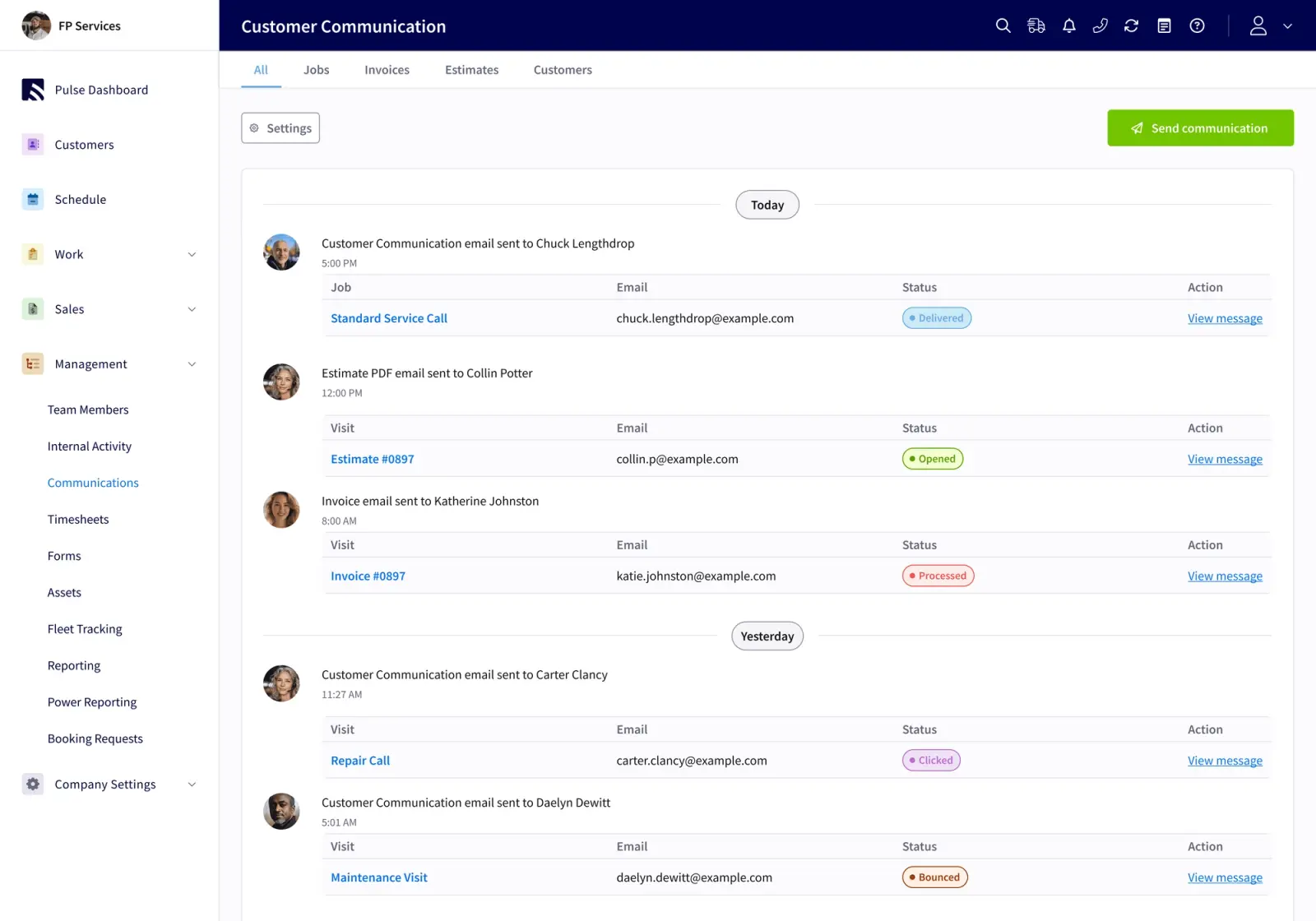
The spine is ClearPath, included in the core platform. ClearPath turns your own process into defined job stages, required actions at each stage, and ClearPath’s Mobile Focus View that shows your techs only what the current step needs. This is what makes the standardization in Step 3 stick instead of living in a document nobody reads on a busy week. Your office defines the stages once. Your techs follow them on their phones. Your office sees job progress without a phone call.
Around ClearPath sits the full job lifecycle, from scheduling and dispatch through estimates, invoices, job costing, payments, and reporting. The two-way QuickBooks Online sync ties it together, so a correction made in your books carries back into FieldPulse instead of being overwritten. That sync is what actually ends double data entry and stops the double-job tax from scaling with your volume.
FieldPulse holds a 4.8 out of 5 aggregate rating across major software-review sites. Customers report measurable gains after switching: office teams save 40+ hours per month, field teams improve on-time delivery by 50%, and businesses add 16+ customers every month on average.
Named customer results show what this looks like in practice. RDI moved from three weeks to five days on time-to-invoice, which is well below the 22-to-30-day industry average mentioned earlier, and from 10 to 30–40 jobs per week after implementing FieldPulse, without that improvement being a guarantee for every business. Fair Comfort Solutions cut estimate creation from four to eight hours per quote down to four to eight minutes after connecting the pre-built Reece HVAC pricebook. Window Fix saved 15–20 hours per week and went from 300+ jobs stuck in a generic “on hold” status to zero.
A note on fit: FieldPulse supports commercial work but is built primarily for residential teams. If your business is a one-person operation, another option will likely fit better.
If your office administrator is reading this, the two-way QuickBooks Online sync is the feature worth asking about in a demo. It is the feature that makes the second pass unnecessary.
See how FieldPulse connects your office and your field on one workflow. Get a demo.
Frequently Asked Questions
How Long Does It Take to See Improvement?
The 30-day sequence is a starting cadence, not a finish line. Most teams see the first measurable change in the closeout-to-invoice path within two to three weeks of standardizing their closeout process. The exception review habit, the standing weekly meeting, is what sustains improvement after that. Metrics that do not have a review attached to them tend to plateau.
Does This Require New Software?
No. The sequence works with manual tools, and the diagnostic steps in weeks one and two require nothing more than a whiteboard and your office administrator in the room. Software is what holds the standardized workflow in place as your team grows. A process that lives in a document stops being followed the first busy week. A process that lives in the system your techs use every day gets followed because it is the path of least resistance.
How Do I Get Techs to Adopt a Standardized Workflow?
Show them a short, ordered list of what the current job stage requires, not a whole application to navigate. The tech should see only what the current step needs, such as the checklist, the required photo, and the customer’s access note. Frame the workflow as the thing that means they do not have to call the office for information they should already have. Avoid framing GPS, fleet tracking, or timesheets as ways to monitor them. The adoption question is almost always answered by what the tech gets out of the system, rather than what the office gets.
What Do I Do When the Office Is the Bottleneck?
Start with the double-job tax and the closeout-to-invoice path, where the second pass lives. Every job your tech closes in the field that still requires manual re-entry at the office is a job your office is doing twice. Fix the closeout path first, and the office bottleneck shrinks before you add a single new crew member.
How Does This Differ For A Smaller Or Larger Team?
Below roughly seven techs, memory covers most of the gaps and the sequence is lighter, because the owner is close enough to every job that manual coordination still works. Above roughly fifty, the handoffs multiply across locations, job types, and roles, and the standardization work becomes the primary management challenge rather than a one-time project. The five breakdowns described in this article appear at every size. FieldMotion’s five field service breaking points begin to break the business at seven or eight engineers, when manual scheduling collapses. Further breakdowns emerge at 8–10 and 10–12 engineers. That is why the seven-to-eight mark is the turning point where most teams start looking for a fix.
See how FieldPulse supports your next stage of growth.


